# A tibble: 6 × 6
  LotFrontage LotArea MasVnrArea TotalBsmtSF GrLivArea SalePrice
        <dbl>   <dbl>      <dbl>       <dbl>     <dbl>     <dbl>
1          50    8500          0         649      1317     40000
2          65    6040          0           0      1152     82000
3          33    4456          0         736      1452    113000
4          52    6240          0         816      1176    114500
5         110    8472          0         816       816    110000
6 60 7200 0 780 780 124900Model Selection
Regularization Methods
Last week: stepwise selection
We learned how to select a model using stepwise algorithms
these are greedy algorithms
results depend on the order in which variables are selected
variables are either in or out
If we can think out as the estimated coefficient being \(0\), can we smoothly shrink the estimator instead of selecting between a value and \(0\)?
Today: regularization methods
Regularized methods
Can we select and train models at once?
Biased estimators
Dataset
Let’s use part of the Ames Housing dataset to introduce and illustrate regularized methods.
Stepwise Selection
Let’s use the “forward” selection algorithm on this (smaller) training set to select some of the variables to predict SalePrice
Housing_forward_sel <- regsubsets(
  x = SalePrice ~ ., nvmax = 19,
  data = training_Housing[,c(1:5,20)],
  method = "forward",
)

summary(Housing_forward_sel)[[1]]
(Intercept) LotFrontage LotArea MasVnrArea TotalBsmtSF GrLivArea
1 TRUE FALSE FALSE FALSE FALSE TRUE
2 TRUE FALSE FALSE FALSE TRUE TRUE
3 TRUE FALSE FALSE TRUE TRUE TRUE
4 TRUE FALSE TRUE TRUE TRUE TRUE
5 TRUE TRUE TRUE TRUE TRUE TRUECoefficients of selected variables
(Intercept)   GrLivArea
816.3893 119.0938 (Intercept) TotalBsmtSF GrLivArea
-40522.44180 83.88263 88.12881 The estimated coefficient for TotalBsmtSF “jumps” from 0 to 83.88.
Similarly for other coefficients in other steps.
Can the selection be done more “smoothly”??
Regularization methods!!
Regularization (or penalized or shrinkage) shrink coefficients in a continuous way by adding a penalty to the objective funcion.
Mathematically, instead of minimizing the RSS
\[ \ \min_{\beta_0, \boldsymbol{\beta}} \ \sum_{i=1}^n \left(Y_i - \beta_0 - \boldsymbol{X}_i \boldsymbol{\beta} \right)^2 \]
we minimize the penalized RSS, for example:
\[ \sum_{i=1}^n \left(Y_i - \beta_0 - \boldsymbol{X}_i \boldsymbol{\beta} \right)^2 + \ \overbrace{\lambda \ \sum_{j=1}^p \, \beta_j^2}^{penalty} \ \]
Ridge vs LASSO: penalty
We’ll focus on 2 methods (there are many other penalty functions one can use!)
Ridge uses an \(L_2-\)norm to measure the size of the coefficients \[\lVert \beta \rVert_2^2 = \sum_{j = 1}^{p} \beta_j^2\]
Lasso uses an \(L_1-\)norm to measure the size of the coefficients \[\lVert \beta \rVert_1 = \sum_{j = 1}^{p} |\beta_j|\]
Ridge vs LASSO: objective function
Ridge
\[ \sum_{i=1}^n \left(Y_i - \beta_0 - \boldsymbol{X}_i \boldsymbol{\beta} \right)^2 + \ \overbrace{\lambda \ \sum_{j=1}^p \, \beta_j^2}^{penalty} \ \]
LASSO
\[ \sum_{i=1}^n \left(Y_i - \beta_0 - \boldsymbol{X}_i \boldsymbol{\beta} \right)^2 + \ \overbrace{\lambda \ \sum_{j=1}^p \, |\beta_j|}^{penalty} \ \]
The penalty parameter
Scroll down to see full content
How much to shrink??
\(\lambda\) is called the penalty parameter
If \(\lambda = 0\), the objective function of the shrinkage methods is the same as that of LS!! Same estimators!!
As \(\lambda\) grows, coefficients are shrunk.
- LASSO eventually shrinks them all to zero
- Ridge will never reach a value of zero
The penalty parameter \(\lambda\) can be selected using the data. This process is called “tuning”.
- an option is to select the value that yields the smallest \(\text{MSE}_{\text{test}}\).
- this tuning is done using an internal cross-validation or a validation set so that the model does not use test data
Equivalently, we can think that we impose a bound on the size of the coefficients.
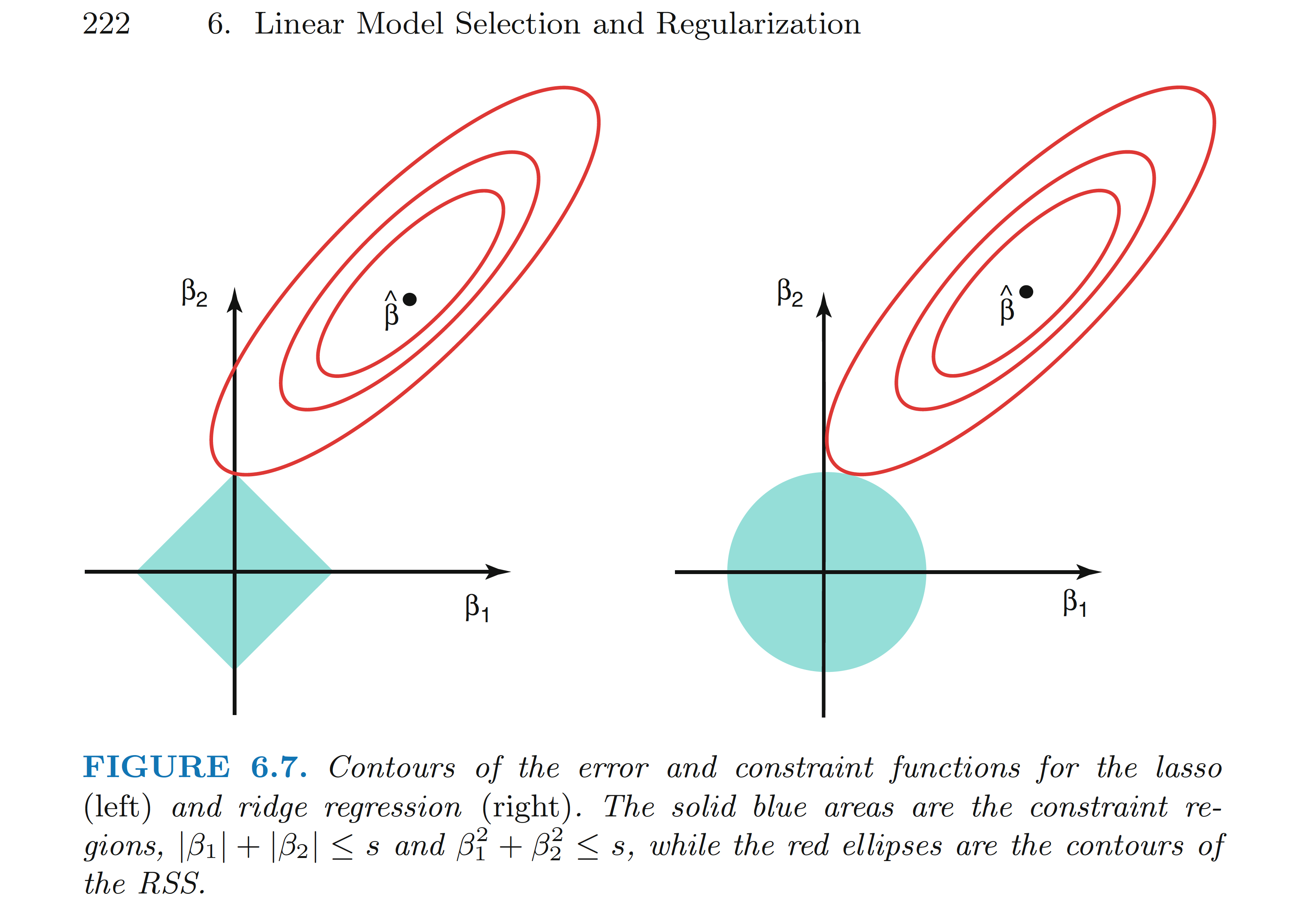
Figure from ISLR book
Ridge
Proposed in 1970 by Hoerl, A.E. and Kennard, R. in
It does not shrink parameters to \(0\), so it does not select variables
It has been proposed as a method to address multicollinearity problems (we’ll skip the math)
LASSO
The least absolute shrinkage and selection operator
Proposed in 1996 by Tibshirani in
it does shrink coefficients to \(0\), thus it can be used to simultaneously select and train (estimate) a model!!
It has been proposed as a method to select strong predictive models
Bias
This “shrinkage” process biases the estimated coefficients!
- we sacrifice bias for a lower variance to potentially gain prediction performance!!
Important: since the method depend on the size of the coefficients, we need to standardize the input variables (default option)
In R
Scroll down to see full content
To build a regularized regression we can use the package glmnet in R. Check this useful vignette
the
glmnet()function requires: a matrix with input variables and a vector of responsesthe argument
alpha = 1corresponds to a LASSO penalty andalpha = 0for a Ridge penalty
There are infinite other options in between known as Elastic Net
glmnet()selects a grid of \(\lambda\) values by default or you can specify oneit is recommended to use given extraction fuctions to obtain the objects, e.g., estimated coefficients
the function
cv.glmnet()can be used to find an “optimal” value of \(\lambda\) by cross-validation
CV creates many test sets from the training set (we’ll see CV later)
- we can visualize how the estimated test MSE changes for different values of \(\lambda\)
Step 1 -3
- create matrices
- set
alpha = 1for LASSO - create a grid of
lambdavalues (try using the default as well)
Housing_X_train <- as.matrix(training_Housing[,-20])
Housing_Y_train <- as.matrix(training_Housing[,20])

Housing_X_test <- as.matrix(testing_Housing[,-20])
Housing_Y_test <- as.matrix(testing_Housing[,20])

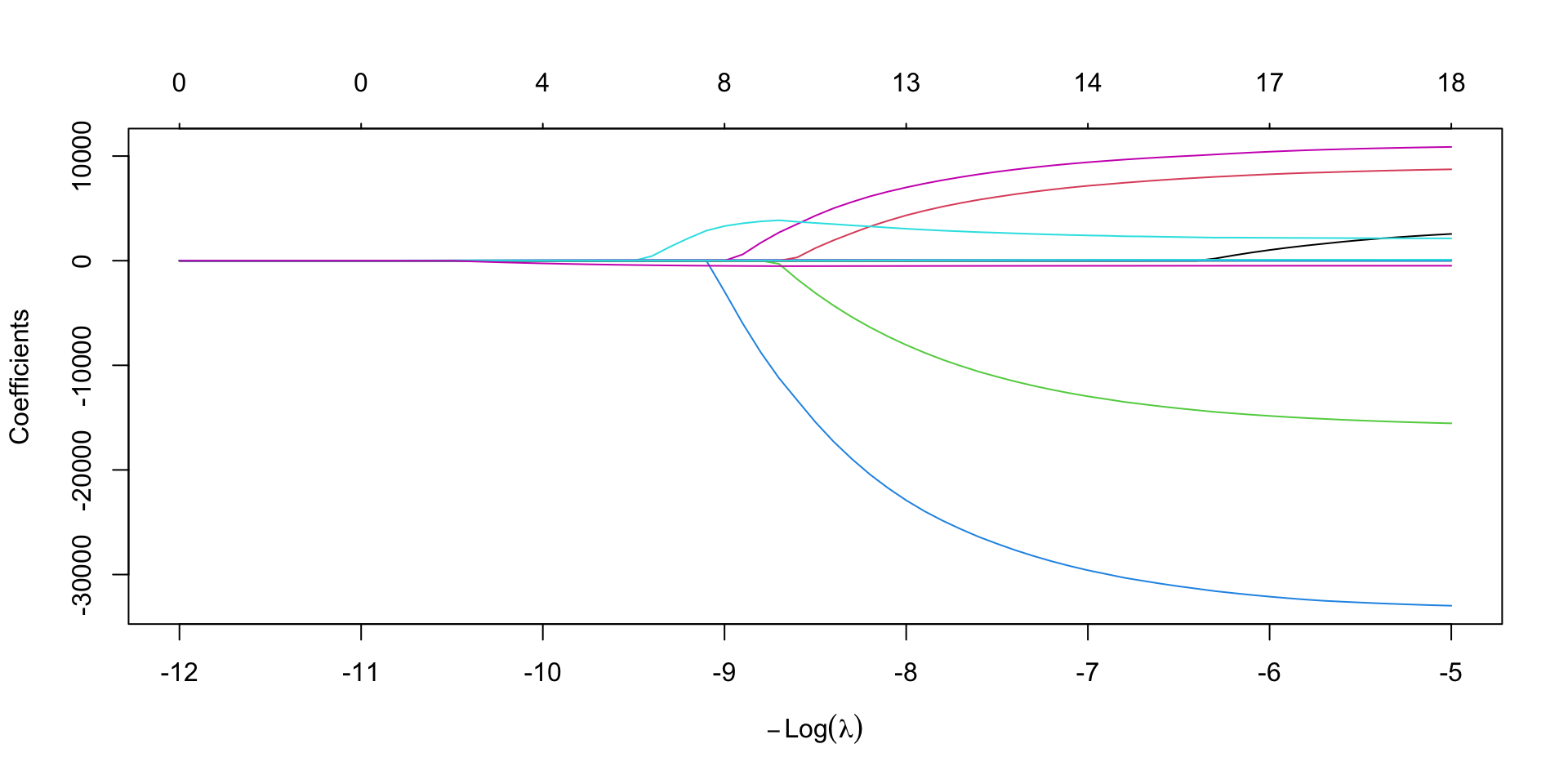
Housing_LASSO <- glmnet(
  x = Housing_X_train, y = Housing_Y_train,
  alpha = 1,
  lambda = exp(seq(5, 12, 0.1))
)
Step 4
Scroll down to see full content
- extract estimated coefficients for a given level of regularization
20 x 1 sparse Matrix of class "dgCMatrix"
                   s=40000
(Intercept)   1.116881e+05
LotFrontage   .
LotArea       .
MasVnrArea    .
TotalBsmtSF   1.447926e+01
GrLivArea     3.126415e+01
BsmtFullBath  .
BsmtHalfBath  .
FullBath      .
HalfBath      .
BedroomAbvGr  .
KitchenAbvGr  .
Fireplaces    .
GarageArea    9.785771e+00
WoodDeckSF    .
OpenPorchSF   .
EnclosedPorch .
ScreenPorch   .
PoolArea      .
ageSold       .
Step 5
- select the best lambda by CV
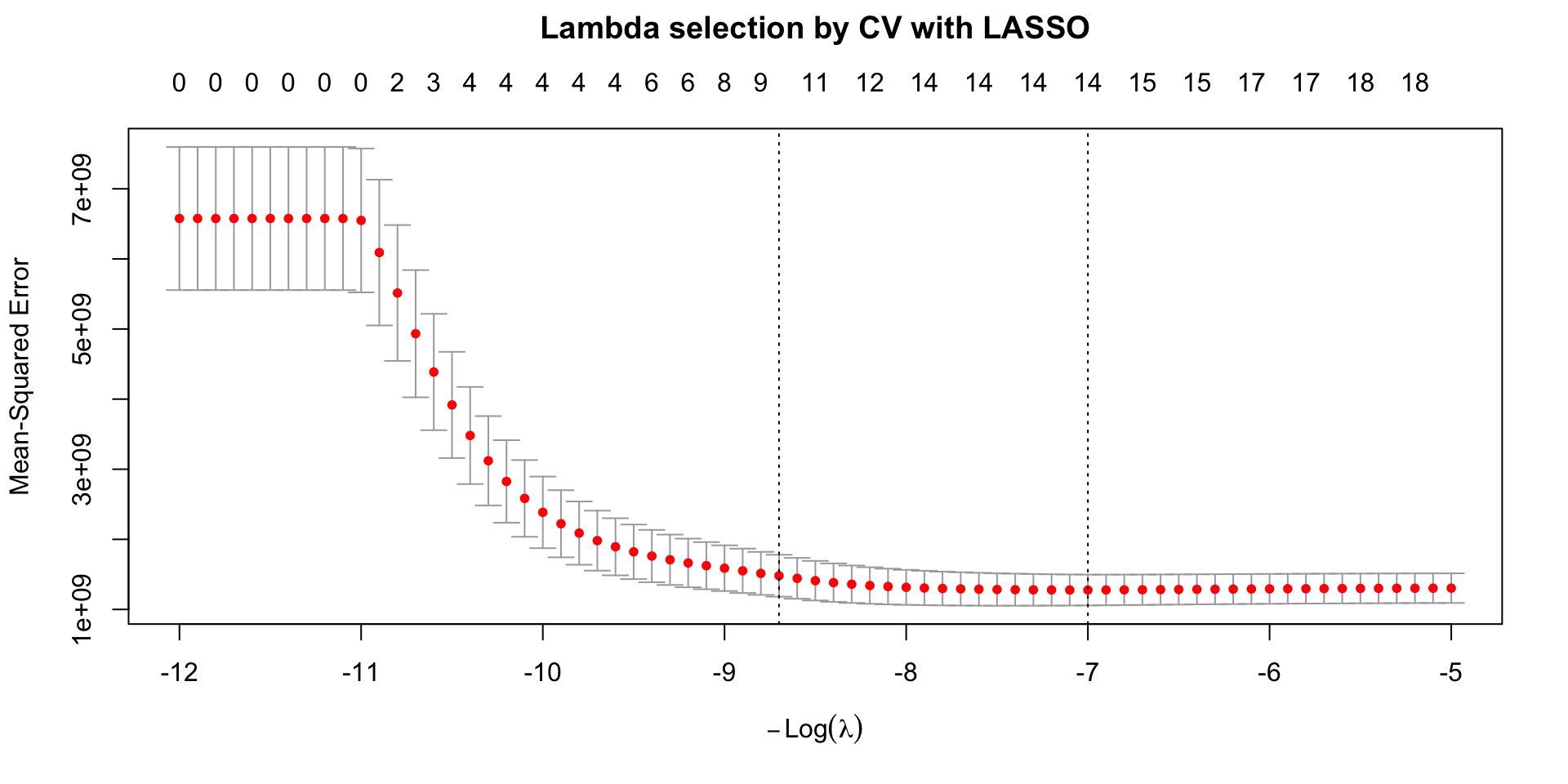
Minimizing the MSE
The plot shows the estimated (by CV) test mean squared error (MSE, \(y\)-axis) for a grid of values of \(\lambda\) (\(x\)-axis on the natural log-scale).
the numbers at the top \(x\)-axis indicate the number of inputs whose estimated coefficients are different from zero for different values of \(\lambda\).
the error bars represent the variation across the different test sets of the CV (folds)
Selection of penalty level
The two vertical dotted lines correspond to two values of \(\lambda\):
\(\hat{\lambda}_{\text{min}}\) which provides the minimum MSE in the grid.
\(\hat{\lambda}_{\text{1SE}}\) largest value of lambda such that the corresponding MSE is within 1 standard error of that of the minimum (more penalization at a low cost)
LASSO “smoothly” selects variables and trains the corresponding model for the values of lambda in the grid
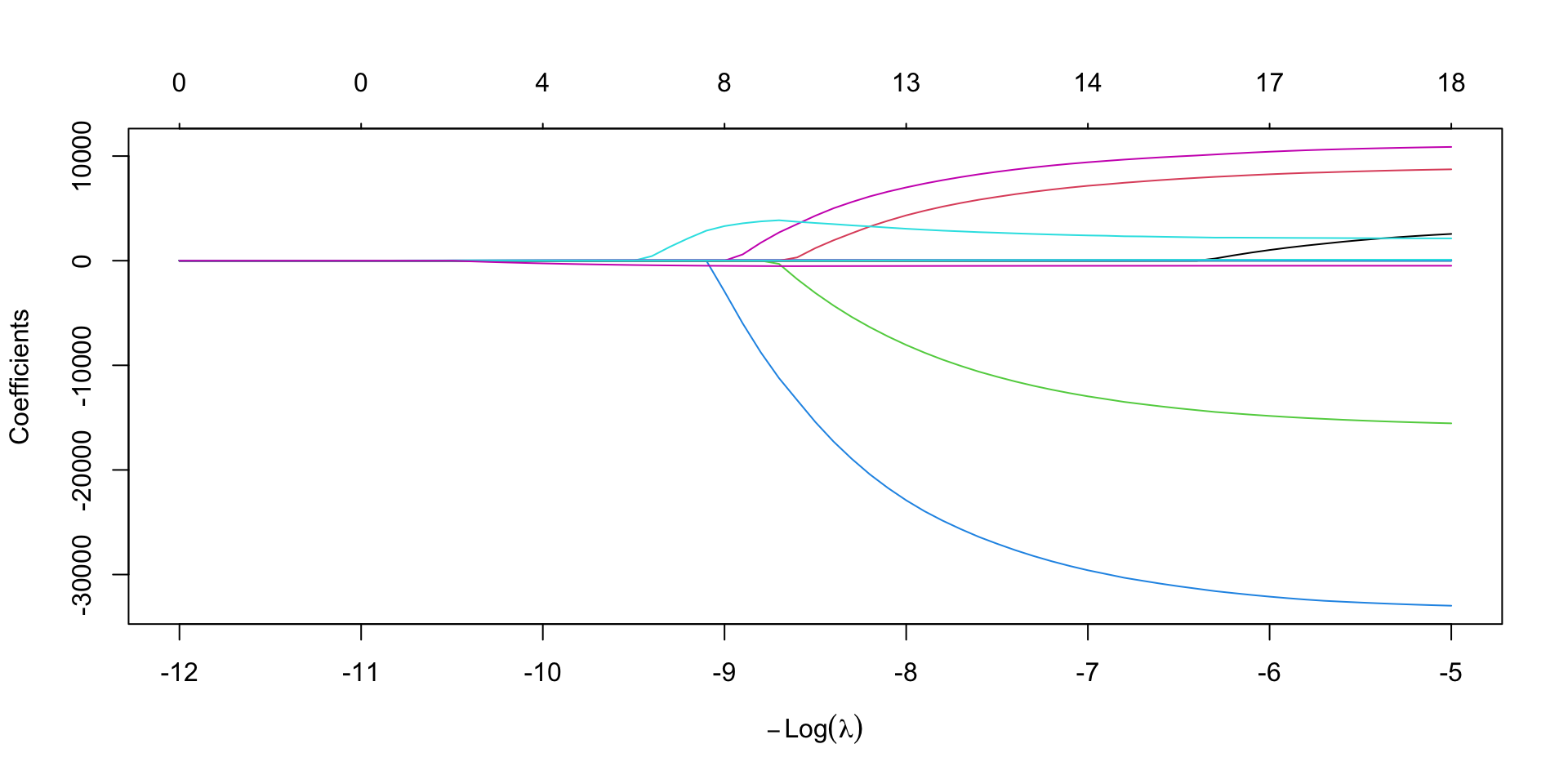
Step 5 targeted
5’. extract the estimated coefficients that minimize the CV-test MSE (or the 1SE option).
20 x 1 sparse Matrix of class "dgCMatrix"
                lambda.min
(Intercept)    44109.52081
LotFrontage        .
LotArea            1.74035
MasVnrArea        32.59693
TotalBsmtSF       37.95458
GrLivArea         80.90134
BsmtFullBath    9407.91300
BsmtHalfBath       .
FullBath        7159.11808
HalfBath           .
BedroomAbvGr  -12964.72474
KitchenAbvGr  -29590.90301
Fireplaces      2414.90241
GarageArea        46.58762
WoodDeckSF        10.59831
OpenPorchSF       20.08263
EnclosedPorch      .
ScreenPorch        .
PoolArea          73.23908
ageSold         -489.95991
Prediction
LASSO was proposed as a method to build strong predictive models. Let’s use it to predict SalePrice in the test set.
Housing_test_pred_LASSO_min <-
            predict(Housing_cv_LASSO,
            newx = Housing_X_test,
            s = "lambda.min")
tibble(Housing_Y_test,LASSO_prediction = Housing_test_pred_LASSO_min) %>% head()
# A tibble: 6 × 2
Housing_Y_test[,"SalePrice"] LASSO_prediction[,"lambda.min"]
<dbl> <dbl>
1 223500 231772.
2 140000 164854.
3 129900 153479.
4 118000 93876.
5 279500 239443.
6 132000 98443.Can we use LASSO for inference??
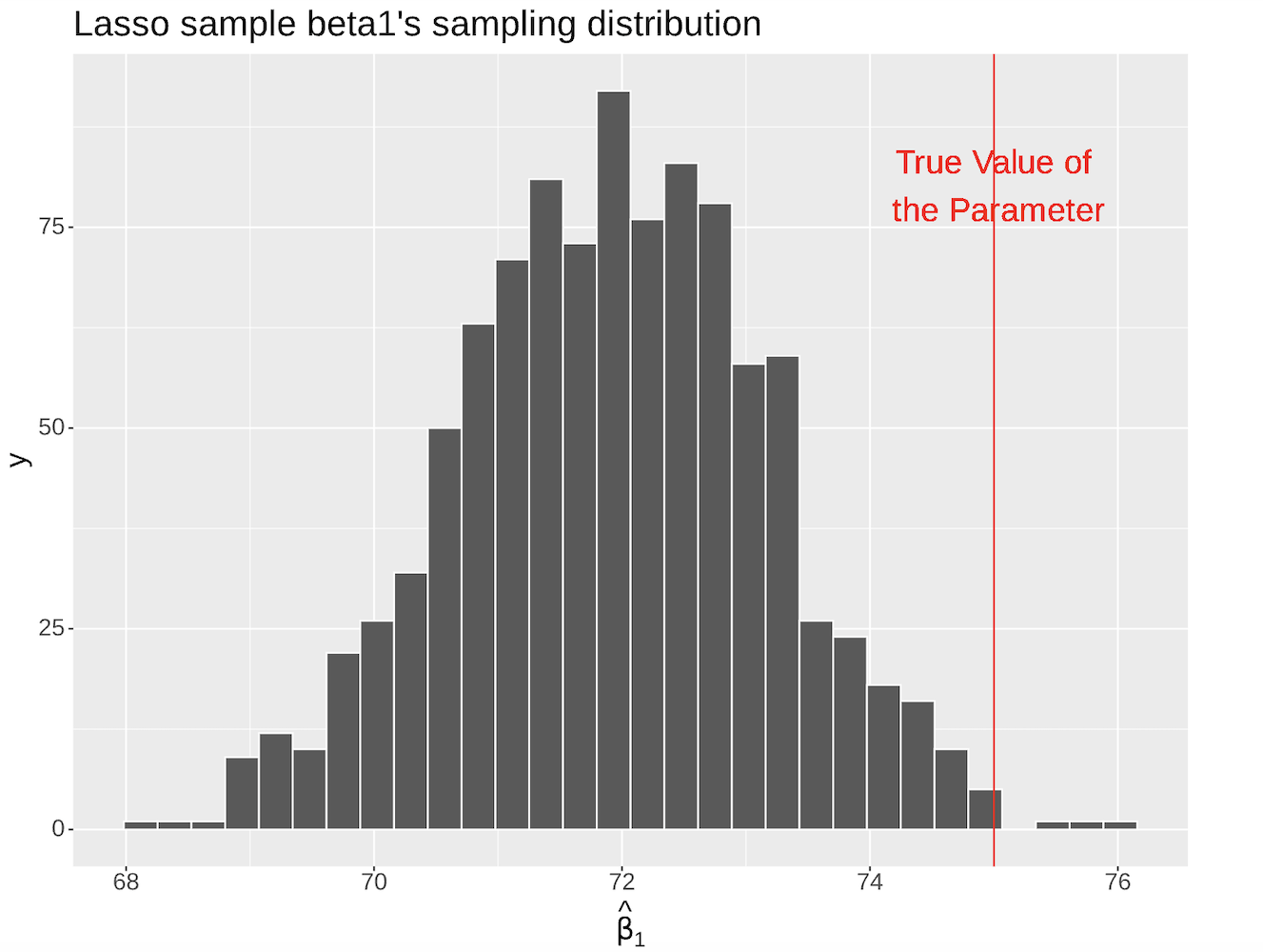
The main drawback of using LASSO for inference is that the estimated coefficients are biased. (in worksheet_08)
The map function
In the worksheet and tutorial, you’ll simulate data to explore different problems related to model selection.
the function
mapapplies different funtions to a list of datasets (identified by thereplicatevariable)the output of
mapis also a list
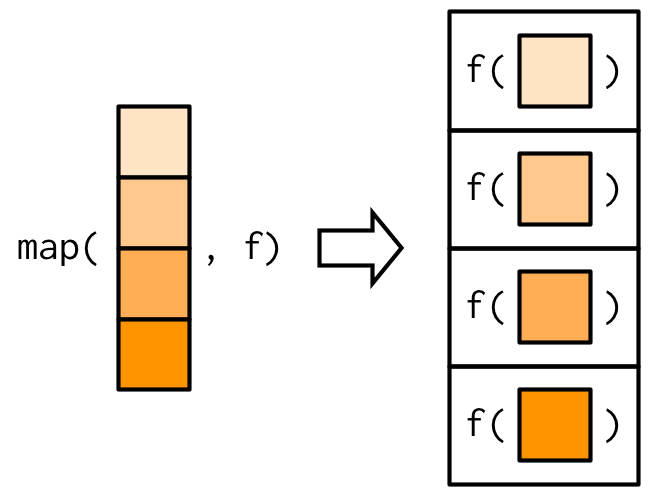
Image from Advaced R, by H. Wickham
For example (from your worksheet)
mapis used to fit LS to each dataset using the functionlm(f in the figure)the output is a list containing the elements
replicate,data, andmodels(the fitted models)!!
© 2026 Gabriela Cohen Freue – Material Licensed under CC By-SA 4.0